Explains lab test results and medical reports to you in simple language.
Clarity also answers your follow-up questions on what to do at home and what warning signs to watch for.
Available on all your devices. Start understanding your health better today.


See Clarity in action
Watch a short demo of Clarity turning a medical report into plain-language explanations you can use at home.
Why Clarity?
The Problem
Consultation time with our doctor is limited. We often find it hard to fully understand our lab test results and diagnostic reports. It's also hard to think of all the questions we want to ask on the spot.
How it works
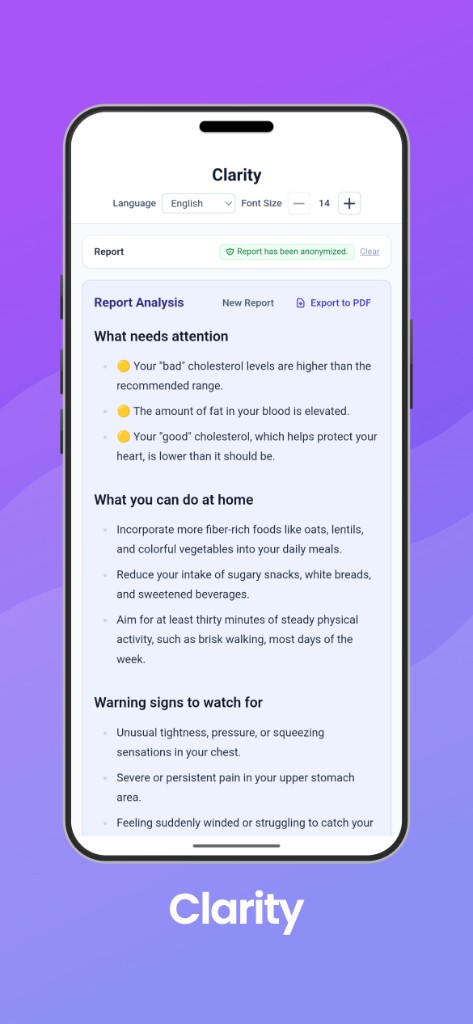
Clarity analyzes your report and provides the key information in plain language — what to pay attention to, what to do at home, and what warning signs to watch for.
Privacy Protected
Clarity automatically removes your name and other personal information from the file. Only the de-identified report content is analyzed.
Languages
Clarity’s app interface and explanations are available in the following languages. Choose your language in the app to read summaries and ask follow-up questions in your preferred language.
- English
- Français
- Español
- Português
- 简体中文 (Simplified Chinese)
- 繁體中文 (Traditional Chinese)
- हिन्दी (Hindi)
- Tiếng Việt (Vietnamese)
Step-by-step instructions for common Canadian lab and health portals.
LifeLabs (MyCareCompass)
Most routine results are available within 24–48 hours after your visit.
- Log in: Access your account at MyCareCompass.
- Navigate: Click on the "Reports" or "Results" tab.
- Select: Choose the specific lab visit or test you want to view.
- Download: Click the "Download PDF" button (select "Summary Report" for a clear overview).
Dynacare (Dynacare Plus)
Dynacare Plus is a paid or sponsored service that tracks results over time.
- Log in: Sign in at Dynacare Plus and ensure your identity is verified (e.g., via Interac verification or a provided PIN).
- Navigate: Select "My Lab Results".
- Select: Click on a specific order from your Order Summary to see the results overview.
- Download: Look for the "Create PDF" button. If a report is already pre-generated, click the provided link to open and save it.
Alpha Labs (Patient Portal)
Results are typically available within 48 hours for most routine tests.
- Log in: Go to the Alpha Patient Portal and log in.
- Navigate: Click on the "Quick Tests™" link or view your results dashboard.
- Select: Open the specific result you wish to save.
- Download: Scroll to the bottom of the results page and click "Download PDF".
Biron Groupe Santé (MyBiron)
This provider primarily serves Quebec and delivers results directly to your account.
- Log in: Access your account at MyBiron.
- Navigate: Go to the "Results" or "Laboratory" section of your dashboard.
- Download: Click on the desired result; reports are provided in PDF format for one-click downloading.
Provincial health gateways
If you cannot find your report through a private lab portal, you can often download them from provincial records.
- Ontario: Access the Ontario Health (OLIS) system or your local hospital's MyChart.
- British Columbia: Use the Health Gateway to view and download lab results securely.
- Unity Health Toronto: Use the hospital network's patient portal or MyChart to view and download results.
How to get your radiology reports
Patients can access their medical imaging results through three primary channels.
- PocketHealth (common for private & community clinics): Many private clinics and some hospitals use PocketHealth to share diagnostic-quality images and reports directly with patients. Once you're enrolled, you can view your records as soon as they are uploaded, often before your follow-up appointment.
- Provincial health portals:
- Ontario: Use MyChart (tethered to specific hospital networks like Sunnybrook) or Ontario Health for hospital-based imaging.
- British Columbia: The Health Gateway provides access to diagnostic imaging reports from public health facilities for tests performed after September 2023.
- Alberta: Residents can use MyHealth Records to view reports for X-rays, CTs, and MRIs, typically within 48 hours of completion.
Instructions for major US laboratory and healthcare portals.
National Laboratory Portals
If you went to a standalone lab location, your results are likely here:
- MyQuest (Quest Diagnostics): Access results for tests performed at any Quest Diagnostics location.
- Labcorp Patient Portal: View and download results from Labcorp, typically available as soon as they are finalized.
- BioReference Patient Portal: Used for tests ordered through BioReference Health.
Government & Healthcare Network Portals
Portals used by major hospital networks and private practices.
- My HealtheVet (Veterans Affairs): The official portal for U.S. Veterans to access their VA medical records and lab results.
- MyChart (Epic Systems): A common platform used by hundreds of hospital networks (e.g., Johns Hopkins, Mayo Clinic, Kaiser Permanente). You can search for your specific provider on their login page.
- FollowMyHealth: Another widely used platform for private physician practices and specialized clinics.
- AthenaHealth Patient Portal: Often used by smaller independent doctor's offices.
Supplementary Only
Clarity is a supplementary tool designed to improve your understanding of reports and respond to common follow-up questions.
Key Findings
What the results actually mean for your health.
At-Home Actions
Practical steps you can take while waiting for your next appointment.
Warning Signs
Clear guidance on when you should seek immediate professional medical attention.